
November 30: Free Super Sunday Daylong Winners
This weekend’s Super Sunday Daylong winners are: stiopa231 with a score of ...


You'll all see a fresh new look in the tournament list on BBO from today. The list has been redesigned meaning you can filter for tourneys. These handy filters help you select games by format, points, club, and more.
Of course, you can still search for tourneys too, just like you did before.
To quickly grasp how best to use the new list, read the step-by-step guide - it only takes a minute, and will have you finding your favorite tournament in no time. You'll most likely discover similar games while you're at it.
For those of you who have already been using the tournament list, you'll notice some visual changes meaning you will be able to see more tourneys at once. This has been done in response to your feedback, so big thanks go to everyone who have shared their ideas.
Finally - be sure to click the Compact and Detailed View buttons to see which display is best for you. You can see these buttons in the images below.


Your comments are shaping what we do, and we’re taking all of them into account as we continue to refine the new list. With this in mind, please share your thoughts on the forum. We really appreciate you taking the time to share your ideas.


Don't do this. I am seriously considering not playing at BBO anymore.
very bad format please change
this is horrible please go back
the new format is terrible
Trying to fix something that is not broken makes no sense. The new format is very hard to read because the type is too small.
yes yes yes
Grrrr I press the 1st button that says register and then I have to press it again on the 2nd screen ... but I don't always because I think I have already registered 🙁 Then when I wait for my tourney I am not in it. So much wasted time .
Dreadful.
If you know the director number of the game you're interested in make him one of the people you follow. Then you can scroll through the list of tournaments to see his vacb number highlighted.
and the old format was better
Hi Jim, In the new design, the host’s name still appears highlighted if you follow them, so you can spot their games the same way as before. 🙂
Trash the whole boondoggle. "This has been done in response to your feedback, so big thanks go to everyone who have shared their ideas." Really? This is what they asked for?
We understand it might not feel like a perfect fit yet. Some of the updates — like the larger font, compact view option, and clearer pricing before registration — were based directly on player feedback from the first release. We’re continuing to make gradual improvements as more feedback comes in.
What are other Bridge sites??????????
The new list is dreadful. Hard to use and impossible to follow. Please bring back the old format. It worked very well for everyone.
hear ear!
The old format was very good. This one is terible!
100% AGREE!!!!
Right on. Kill this new format please
Totally agree
YES
amateurish.
If you want to improve the list, then allow users to save a customized search list that prioritizes the games that they usually play.
For example, if a user tends to play Express Reward games, then allow a custom filter field that is saved for that particular user.
This is really software 101
Terrible
And I have been getting the retry message for a week. How do I get in?
the best is the enemy for the good
Let me put a star tag on my Favorite clubs, games etc....
What I want is a way to do a search for Virtual Club games excluding the ACBL Clubhouse Games. That should not be hard !!!! I have to scroll through all those empty games to find a decently attended game. Click the Entries tab should be able to sort by number of entries like any sane internet app does. Even a simple excel spreadsheet can do that. So far the changes are useless to me and I can't be the only one can see the BBO powers that be don't use the app !!
Hi JFrizz, at the moment (same as in the old list), you can do it by using the search box. There’s a search box at the top right where you can type your virtual club’s host name, for example “VACB,” to find the games you want. Also, thanks for sharing your feedback, we’ll make note of it. 🙂
The font is too small and the yellow once entered in the tournament is not bold enough. There's also no box for speedball which is what I would like. So, these changes did not help make things easier as I presume you intended.
I agree too small font difficult to find tournaments much prefer the previous
vrd568gmail.com
I like the filters. very handy. What is incredibly poor for users is how the information disappears when we highlight a row.
I was thrilled when you reverted to the former style. I will be moving to another platform
I agree
Terrible new configuration. Why can’t you just leave well enough alone?
awful. was easier to search before... you need to reformat so clearer to read descriptions of games
Hi guys, please if you make something new please try not to be as awful as this one is. I'll give you a couple of comments in an effort to make the new list bearable:
- first and foremost the filters are silly and useless. You cannot filter out what you do not want. For example, if you go through the BXP button, you have zillion of tournaments shown. First 4 to 5 pages are daylong, then sill ABCL house (maybe there is a reason they are first even though they might be played hours later :)). So, if you want to play a normal tournament a lot of fussing with the mouse is needed. Exclusion filters are a must.
- there are very few fields. Everything is now lumped together in an obnoxious and unreadable string. please make this as a set of fields
- related to above, once you sort the fields, implement sorting up/down initiated by the click on the heading.
- etc, etc, so please it is not difficult to explain what you want to Chat GPT and let it create a usable list.
all together huh
Please keep the old format and stop trying to improve. Me and all my BBO partners and opponents are against any changes.
I prefer the old format with larger fonts.
What ever happened to K.I.S.S. ?
This is the beginning of the end for BBO.
Filters welcomed, clutter not.
Keep it simple, just the name of the tournament.
There's a lot of elderly bridge players, so larger text doesn't hurt.
Elderly people are Not silly, it is better this way, because you do not See tournements, you do not want to play
Another retrograde step. Change for the sake of change with no improvement Keep going, keep ignoring these comments and destroy a once great site. (The rough idea is to get people playing not deflect them)
Primitive and stupid. Should allow a custom default list since many people play the same games repeatedly.
Not even close to the old format, it does not show the type of game - all quite confusing. A bad move
Hi, you can see the type of game next to the game title, like in the screenshot below:
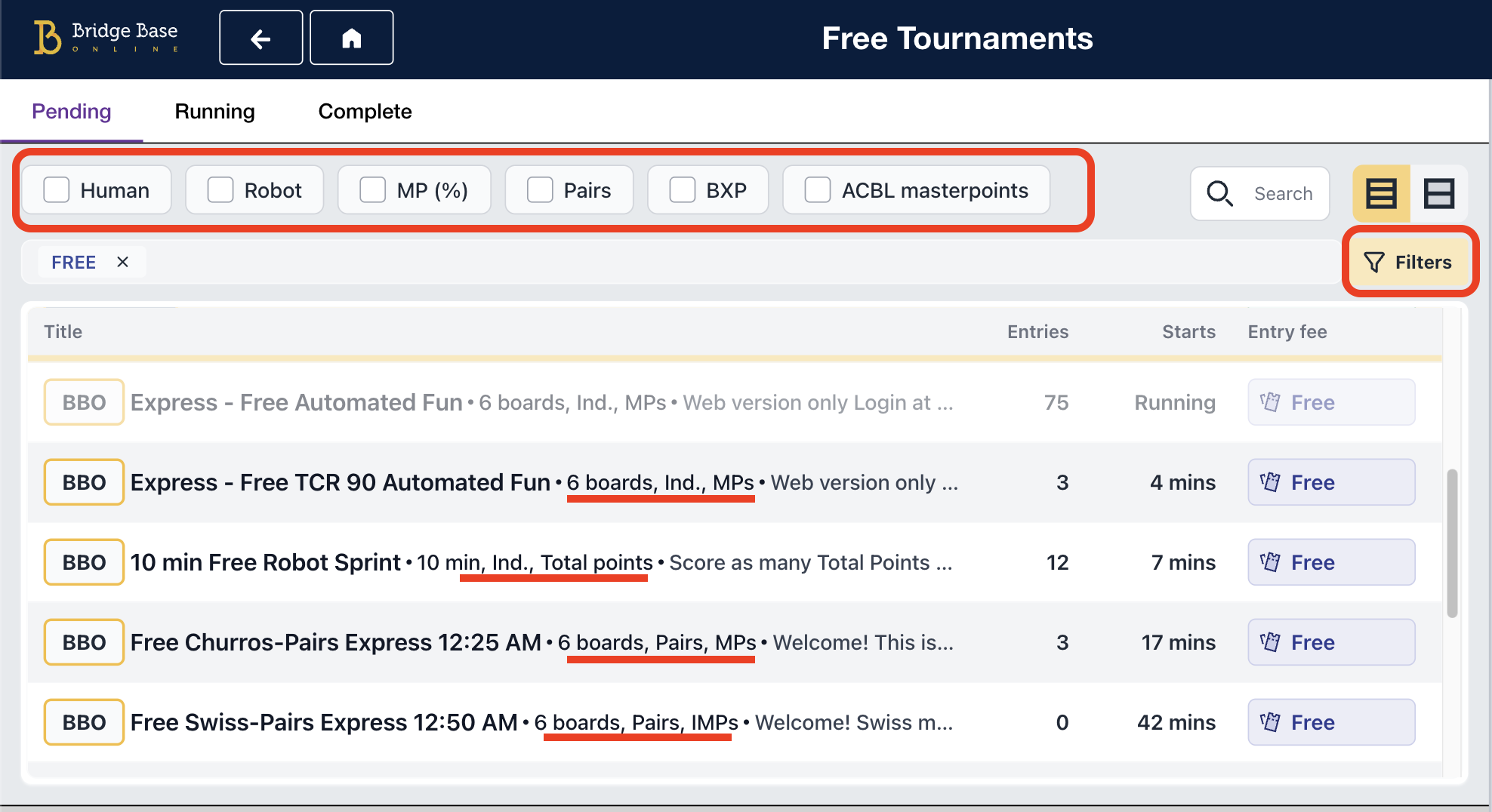
You can also use the filters to narrow down the list based on the type of game you're looking for.
It is terrible--difficult to see and confusing.What a waste of time and money.
Font is small. All info is undistinguished
Thanks for the feedback! The font size was actually increased from the initial release, but we’ll keep monitoring how it feels for players.
Web site is buggy. Failed this morning repeatedly that I almost could not play until my p registered me. Bad design hard to see. E.g. impossible to locate non-LM game, and IMPs game. Fonts are hard to see too.
Thank you for sharing your thoughts, if you have any feedback on how we could improve this you can share it with us in the forum below:
https://www.bridgebase.com/forums/topic/91343-new-tournament-list-feedback-thread/
whatever happened to "if it aint broke... '
Terrible!
Pls at least consider all of the comments section and make improvement
Hi artrx, sure, we're taking notes of your feedback, if you have more details to share you can also put them in the forum here:
https://www.bridgebase.com/forums/topic/91343-new-tournament-list-feedback-thread/ - thank you 🙂
Don't understand why you think, as I am sure you are aware of the average age of the players, that we all have 20/20 vision and love light print
Im trying not to react too quickly. I'm sure I will get used to it. But the new design is more cluttered, and takes more effort to find the tournaments I want. Not a fan.
Just wanted to leave a somewhat positive comment. I like the idea, the filters are good, I do like that when a tournament starts it immediately gets grayed out in the list (which I hope means no more trying to register for a tourney and getting the "Sorry the tournament has already started" popup.)
But the one harsh criticism that I think is warranted is the amount of whitespace in the lists. There really is no reason to put truncated descriptions in there; that's just wasted space. We overwhelmingly know what each tournament is about, and we can always click on it to find out more. Put that text in a hover box or with a (?) icon to pop up. Use more graphics and icons so we can see at a glance what type each tournament is. And, tighten up the spacing. That all will help a lot.
Thank you very much, Nick, for your constructive feedback, we'll take note of these. 🙂
always Bullshit again
Why so small letters?
old version was much better. Can't find 0.10$ BXP tourneys.
To find 0.10$ BXP tourneys click on the 'filters' button, select the BBO World checkbox and then click 'apply filters' - you'll see them all in there.
change is for better not worse, don't see any improvement at all.
Unfriendly.
terrible
Several times it is "Oh no!! An error has occurred while loading the list of tournaments; please try again."
Me too. Can’t find any of the tournaments I played before.
Please go back to former setup.
Hi Noods, the new design might take a little getting used to. If you want help finding the tournaments you used to play, you can contact support@bridgebase.com — they’ll walk you through it. 🙂
Will you and your team please consider the message that is being delivered. The UI is horrific A dog's breakfast.
We are old. We need large easy to read fonts. This new system is horrible.
It is actually not working reliably. Often it encounters errors while loading, and the tournament list is not even accessible
Horrible. And where is the usual Friday Free Just Declare Daylong? Not on the list - and doesn't come up with any of the search filters
ive tried agreeing but it wont allow me to. Terrible!
The Free Just Declare Daylong is still available, you’ll find it in the Free Tournaments section.
If you’re having trouble locating it, feel free to contact support@bridgebase.com for help.
What's with the start times being 2 hours and some minutes away in the list, but the tourney actually starting in a few minutes?
Another botched front-end rollout....
Another failure at software deployment...
it doesnt work. tried lots of times.
I do not like the new format. Not easy to navigate
Extremely small letters. On tablet unreadable.
I agree ... too small fonts ... difficult to readon desktops also
Hi. Free tournaments not working this morning.
It doesnt work
Horrible
Seems to be a step or two back to me.
Previous style preferable.
shows error and i am unable to get pending tournament listing
if it stays like that i might not enter bbo until a either goes back or a new way of filtering will be implemented
Hello 0_alga
You can still use the search box to find the game you are looking for. The new system allows you to filter and search.
terrible
Sorry you don't like it bobj1961 - are you not able to find your tourney?
No, I cannot find the free day long tournaments anymore
To find free daylongs click on the 'filters' button and then select these two check boxes - free, and daylong - then click 'apply filters' and they are then displayed.
Bad
No try more than 2 hours in the future should be listed it clusters up the list
it's still terrible. There is so much white space that you can see only a few tournaments. Why are you changing something that is not broken?
I 100% agree- a disaster
Was happy with the old layout. Why re-invent the wheel when it worked perfectly well.
I 100% agree- a disaster
sehr schlecht gebastellt
so ein mist
It doesnt work. Error when trying
Hi Rosengatan
Is there still an error message? If there is please send a screenshot to the support team who will help with the issue
support@bridgebase.com
very bad, NOT easy
separate free and paid game for easiness.
Hello KH
You can separate free and paid games. Click the filters button and the first thing you see is and entry fees filter. Check the box and click Apply filters. Give it a go.
It would be useful if we could save our default settings on the filter rather than having to keep reentering them. To be honest the interface is very cluttered & the font is too small.